
The Workflow Control and workflows are central to the decision support concepts of PlanTest. The Workflow Control has several unique aspects and functions that should be noted.
The Workflow Control has no toolbar, tools or actions outside of behaviors built into the workflow tree itself. These are described in the other supporting topics. The use of the control is fairly simple, but the flexibility of customization of the workflows themselves may at times present complex contextual behavior. Once you learn the specifics of your site's workflows, use of the tree control will become second nature.

The workflows presented in the control are dynamically loaded from jurisdictional custom workflows created for specific plan or submission types. Depending on the type of data loaded, a specific workflow is loaded and the workflow control presented. These workflows are easily customized. Read more..
In general, there are many more unbound steps in a workflow than unbound steps. Steps with analytic tests are generally targeted at aspects where intensive data computation can save considerable examiner effort. Check only steps are generally directed at issues related to paper documents or other systems that are not digitally integrated to PlanTest. In some jurisdictions, external test results and decisions are imported to PlanTest on loading, so there is an integrated record of analysis and decisions.
The Workflow Control is the primary means to set decisions for workflow steps that have no associated (bound) analytic test. In this regard, it functions as a checklist, where multiple "check" options are possible. It does this with mouse clicks on the step checkbox of the step or group. Read more...
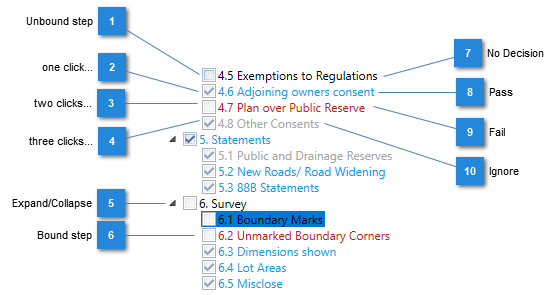
There are several reports that can give a view of the current state of the examination - where decisions are represented for quick visual review. However, the Workflow control is the only control that allows the execution of individual bound step analysis as well as efficient decision making on check only steps. As it clearly shows the workflow organization related to groups, and dynamically updates the group visual, it is also an excellent means to manage complex workflows. Read more...
The Workflow Control state is synchronized with other PlanTest windows, specifically the Test Results, and the Results and Decisions windows. All three windows and their controls can be used to make decisions, and any decision, including comments or analytic test results will be synchronized to show the current state.
The Workflow control is the only control that allows the execution of a single analytic test bound to a step. In most jurisdictions, job control systems initiate an examination with PlanTest startup parameters for automatic data load and execution of all analytic tests. So executing the analysis one by one in the Workflow Control is not done. However, in uses outside the normal examination, PlanTest helps to analyze specific issues - and for this purpose the functionality is essential.