
Steps in the workflow not associated (bound) to an analytic test can have decisions set by clicking the leaf node checkbox. Steps bound to an analytic test must use the Test Results controls or the Results and Decisions controls.
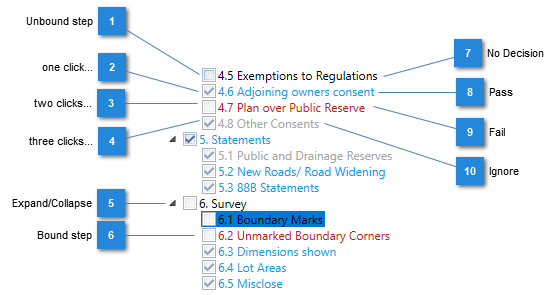
If the unbound step has no decision, you can use the checkbox to set your decision. Multiple clicks cycle through possible decision states.
 and text is blue.
 and text is red. and text is gray. and text returns to the original black.
Clicks on the checkbox can be made in quick succession, or revisited at a later time in the same session. However, in a later session, you will need to use the Test Results controls and provide a comment to change the decision.
If you want to add comments to a check only decision, perhaps to say why it failed, you can select the step (select the text to the right of the checkbox) to open the Test Results window, then add comments there.